
Contacts: Call Log & Dialer
HD Camera DeveloperCommunication
4.317.00 Reviews
- Version
- 1.6
- Installs
- 50.00K
- Age Rating
- Everyone
Screenshots
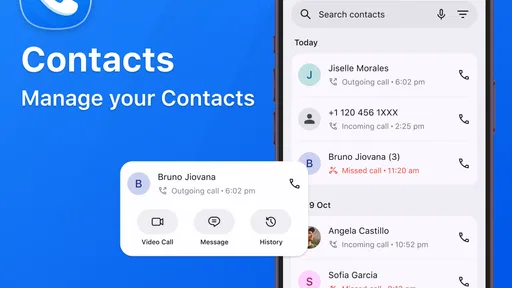
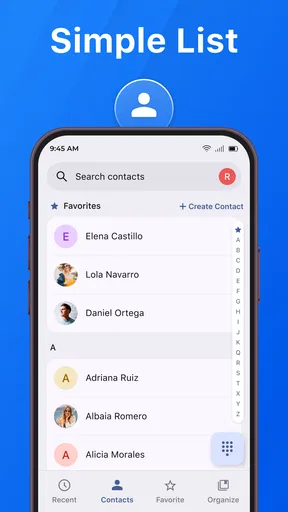
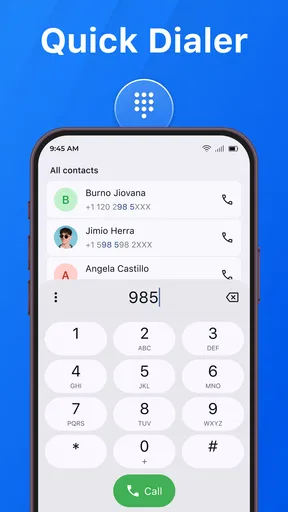
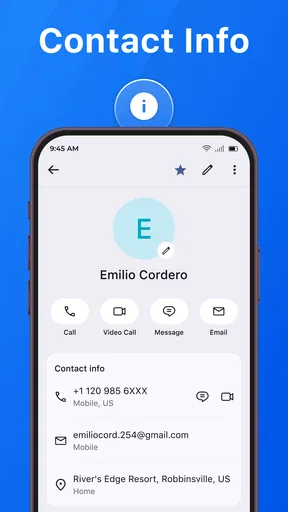
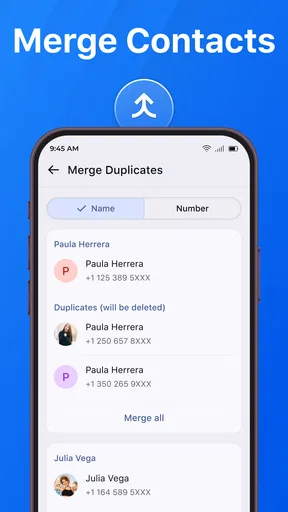
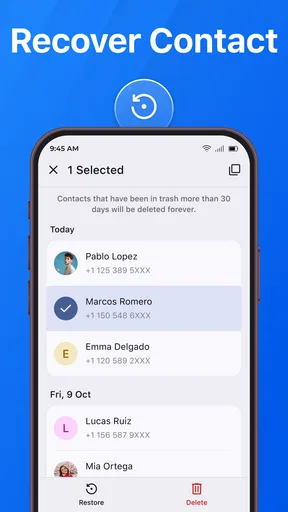
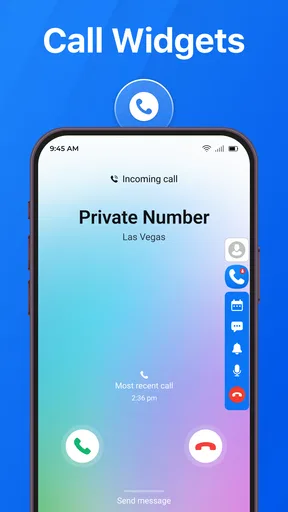
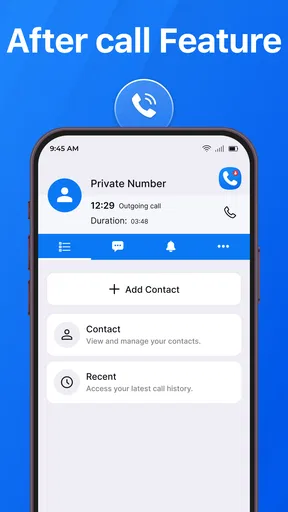
Our Review of Contacts: Call Log & Dialer
 Analysis by Appyee
I like communication apps that remove small daily annoyances rather than trying to replace everything on my phone. Contacts: Call Log & Dialer takes that focused approach. It brings contacts, recent calls, and the phone keypad into one place, so the basic job is easier to reach when I need it. After spending time with it, I found the appeal is less about dramatic new technology and more about reducing the number of steps between seeing a person’s name and calling them.
This is a free communication app from HD Camera Developer, aimed at anyone who wants a straightforward way to organize contacts, review call history, and start calls quickly. It is suitable for Everyone, supports devices running Android 8.0 or later, and its current version is 1.6. The app has passed 50 thousand installs and holds a 4.3 average from more than 400 ratings, which suggests a generally positive reception without making it seem universally perfect.
Where the everyday experience can get stuck
The first thing I noticed is that a contact and a phone call are connected tasks, but many phones separate them across different screens. You may search in the address book, switch to the phone app, check the recent calls list, and then return to the contact you meant to call. This app is useful when that back-and-forth is the part of the routine you dislike.
The main benefit becomes clearer in a realistic situation. Imagine leaving work and needing to call a family member whose number you saved months ago. Instead of opening a general contacts application, hunting through a long list, and then checking whether you have already called that person today, you can use the contact view and call history together. That does not change what a phone call is, but it makes the decision and action feel more connected.
There is also a practical advantage for people who frequently call a mixture of saved contacts and recent numbers. A recent call list is useful when you remember the person but not the exact spelling of their saved name. A contact list is better when you need to confirm identity before calling. Moving between those two kinds of information is the central reason to try this app.
Still, the app should not be mistaken for a complete replacement for every communication tool. Its focus is calling and contact handling. If your day revolves around messaging, video meetings, group chats, or cloud-based address-book management, you will still rely on other apps. I would choose it for a cleaner calling workflow, not as a universal communications hub.
What I would check before blaming the app
Contact apps depend heavily on the phone’s existing information. If a person is missing, appears twice, or has an outdated number, the first place I would inspect is the phone’s contact storage rather than assuming the app damaged anything. A duplicate entry can make the search experience look confusing even when the app is displaying exactly what the device contains.
I would also check whether the number is saved under the name I expect. Small differences such as a nickname, a company name, or an old entry can make a search feel unsuccessful. My practical habit is to search by a distinctive part of the name, then open the matching entry and confirm the number before making the call.
Call history deserves the same caution. A recent call record reflects what the phone has recorded, not necessarily what I remember doing. If I use more than one calling method, such as a regular cellular call and an internet calling service, those activities may not appear in the same place. This is an important trade-off: a focused dialer can make ordinary phone calls easier, but it cannot automatically turn every communication service into one unified history.
Another common source of confusion is the difference between organizing information and changing the information itself. The app can help me find a contact or inspect a call record, but it is not a substitute for keeping phone numbers current. When a contact has several numbers, I slow down and read the labels before tapping the call action. That extra second is worthwhile when one entry contains work, home, and mobile details.
Setup checks that save time later
My recommended setup is deliberately simple. I first make sure the device is running Android 8.0 or newer, since that is the minimum operating system requirement. Then I check that the people I call most often are saved clearly, with names that are easy to recognize at a glance. A tidy contact book makes this app feel much faster than an overcrowded one.
I would begin with a small group of familiar contacts rather than trying to reorganize everything at once. This gives me a quick way to judge whether the search and call-history workflow fits my habits. If I regularly call the same few people, I can test the app during normal use instead of forming an opinion from a long setup session.
It is also worth deciding what I expect from the app before making it the main calling tool. If I want a simple place to find contacts and call recent numbers, the design fits that goal. If I expect automatic merging across several accounts, advanced spam screening, or a deeply customizable phone interface, I should compare it with the dialer already supplied by my phone manufacturer or with a more feature-heavy alternative.
When a calling app behaves differently from the built-in phone application, I avoid changing several phone settings at once. I check one part of the workflow, test a call, and then move to the next. This makes it easier to identify whether the issue involves the contact record, the call history, or the phone’s own handling of calls.
For privacy-conscious users, my advice is equally practical: review the app’s behavior on your own device and only grant access that makes sense for the task you want to perform. Contacts and call history are personal information, so I would not install a calling utility casually on a shared device. The Everyone age rating describes the intended audience, but it should not replace sensible judgment about who can use the phone and see its records.
Recovering a workflow after something goes wrong
When a contact search does not produce the expected result, I use a short recovery routine. I search again using a shorter name, check for a duplicate, and open the phone’s regular contacts area to confirm that the entry still exists. This approach is more reliable than repeatedly tapping the same search result and hoping it refreshes.
If the recent calls view looks incomplete, I first consider timing. A call that was just made may take a moment to appear, while a call made through another service may belong to a different history entirely. I then compare the visible record with the phone’s standard call log. If both views disagree, the phone’s own record is a useful reference point for separating an app display issue from a broader device issue.
For an incorrect number, I stop before calling and edit or correct the contact in the phone’s contact storage. This is one of the most useful habits with any dialer: treat the contact entry as the source that needs fixing, rather than expecting the call screen to repair it automatically. After correcting it, I search for the person again and verify the displayed number.
If the app becomes slow or stops responding, I would close it, reopen it, and test a basic contact search before making more changes. A restart of the phone can also distinguish a temporary device problem from a repeatable app problem. These are basic steps, but they are safer than immediately deleting contact entries or resetting the entire phone.
One non-obvious tip is to use the call history as a memory aid, not as a permanent filing system. When I call someone for a task that will matter later, I make sure the contact name itself is descriptive enough to recognize next time. A vague entry such as a first name alone may be fine for a small address book, but it becomes risky when several people share that name.
When the app is not the cause
Some calling failures have nothing to do with the contact interface. A weak mobile signal, an inactive service plan, an incorrect number, or a problem with the phone’s network connection can all prevent a call even when the app is working normally. I test another known contact and, if appropriate, the ordinary phone application before concluding that this app is responsible.
The same distinction applies to missing contacts. If an account has not finished synchronizing, or if a contact was saved somewhere different from where I expected, no dialer can display information that the device has not made available to it. I check the phone’s contact accounts and the original contact application first, then return to this app once the underlying entry is visible.
Call history can also be affected by the phone itself. A device cleanup tool, a changed account, or a system-level setting may alter what is retained or shown. If several calling tools show the same missing record, I treat that as a phone configuration question rather than an isolated problem with Contacts: Call Log & Dialer.
There is a useful boundary here. The app can streamline access to contacts and ordinary call records, but it cannot improve the quality of a poor network connection or guarantee that another person answers. That sounds obvious, yet it matters when judging a dialer. I evaluate it on how quickly and clearly it helps me begin a call, not on the outcome of the call itself.
Who will appreciate this focused approach?
I think the app is a good match for people who make regular phone calls and want the address book, dial pad, and recent activity to feel like parts of one routine. It is especially suitable for users who find the default phone interface cluttered or who often need to call someone again shortly after a previous conversation.
It can also suit someone moving to an older Android phone that still meets the Android 8.0 requirement. The modest system requirement makes it relevant to devices that are not running the newest software, although the experience will still depend on the phone’s speed and the quality of its existing contact database.
I would be more cautious if your priority is advanced call screening, extensive customization, integrated messaging, or sophisticated synchronization across multiple services. In those cases, the built-in dialer may be better because it is closely tied to the phone system, while a specialized alternative may offer deeper controls. The right choice depends on whether simplicity or breadth matters more to you.
Another trade-off concerns users with a very large or carefully managed contact library. If you already have a well-organized system with labels, groups, account synchronization, and a familiar workflow, changing dialers may not save much time. The app’s value is strongest when it removes friction from basic calling, not when you already have every part of that process under control.
My practical verdict after using it
Contacts: Call Log & Dialer succeeds by keeping its purpose clear. I found it most useful when I wanted to locate a person, confirm a recent interaction, and call without wandering through unrelated phone screens. Its strongest quality is not a flashy extra; it is the way those everyday actions sit close together.
The free price makes it easy to test without committing money, and the 4.3 average indicates that many users find the experience worthwhile. I would still approach it as a focused utility rather than an essential replacement for every phone feature. Before switching fully, I would run the app through the calls I actually make, check how my existing contacts appear, and compare its history with the phone’s standard record.
My final recommendation is simple: try it if your main frustration is the distance between your contacts and your calls. Keep your contact records clean, verify numbers when entries contain several options, and use basic device checks before treating a failed call as an app fault. The best reason to install this app is a smoother everyday calling routine, not a promise to solve network, synchronization, or messaging problems.
For me, that makes it a sensible choice for straightforward phone communication. I would recommend it to a friend who wants a lighter, more direct way to handle contacts and call history, while steering power users toward the phone’s native dialer or a broader alternative if they need deeper controls. The developer, HD Camera Developer, has kept the idea narrow, and that narrowness is both its appeal and the clearest limit.
If your phone runs Android 8.0 or later and your needs center on finding people and calling them quickly, Contacts: Call Log & Dialer is worth testing. Just give it a fair trial with your real contact list and normal calling habits; that will tell you far more than a quick look at the keypad.
Verdict
Strengths of Contacts: Call Log & Dialer
- Quick access to contacts, recent calls, and the dial pad in one place.
- Smart search helps find contacts by name or phone number quickly.
- Customizable themes and layouts make the interface easier to personalize.
- Useful call-management tools help organize and review recent activity.
- Can offer more dialing options than some basic built-in phone apps.
Limitations of Contacts: Call Log & Dialer
- Some features may require permissions that users may consider sensitive.
- Advanced tools or customization options may be locked behind ads or purchases.
- Performance can vary depending on the phone model and Android version.
- Replacing the default dialer may require extra setup and system permissions.
- Privacy policies should be checked carefully before syncing contact information.
Similar Picks in This Category
View All
Google Messages
Google LLC4.6

Gmail
Google LLC4.1

Google Meet
Google LLC4.4

Google Chrome
Google LLC4.1

WhatsApp Messenger
WhatsApp LLC4.6

Carrier Services
Google LLC4.2
Frequently Asked Questions
What is Contacts: Call Log & Dialer, and what can it do?
Contacts: Call Log & Dialer is a phone-management app designed to bring contacts, recent calls, and dialing tools together in one interface. After exploring its main features, the app is most useful for people who want faster access to saved contacts, a clearer call history, and a more convenient way to search numbers and place calls without switching between several separate screens.
Does Contacts: Call Log & Dialer replace the default phone app?
Depending on your device and Android version, Contacts: Call Log & Dialer may be able to work as your default phone or contacts application, but this is not always required. You can usually install it first and test its interface before changing your default settings. If selected as the default dialer, it may need permission to manage calls, contacts, and call history.
What permissions does Contacts: Call Log & Dialer require?
Because this app handles calling and contact information, it may request access to contacts, phone calls, call logs, and sometimes notifications. These permissions are important for features such as displaying caller details, showing recent calls, searching your address book, and placing calls. Before accepting, review the permission explanations and disable anything you consider unnecessary.
Can I use Contacts: Call Log & Dialer to manage and search my contacts?
Yes, contact organization and quick searching are among the app’s main purposes. You can generally browse saved entries, look up a person by name or number, and start a call directly from the contact list. The exact options may vary according to your device, contact accounts, and synchronization settings, so duplicate or incomplete entries may still require manual cleanup.
Is Contacts: Call Log & Dialer free, and are there any limitations?
The app can generally be downloaded and used without an upfront purchase, although availability of advertising, optional upgrades, or premium features may depend on the version installed and your region. Users should check the current Google Play or App Store listing for pricing and subscription details. Also remember that standard mobile carrier charges still apply when making regular phone calls.
